Programming nRF51822 with a Raspberry Pi
Sun, Dec 18, 2016
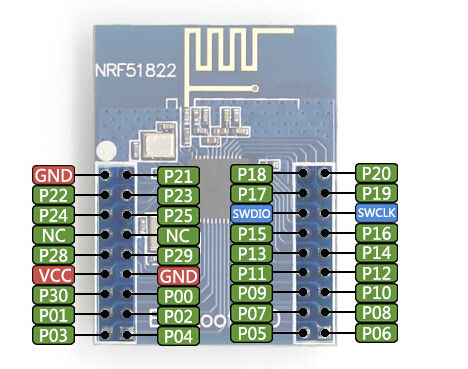
On https://chisight.wordpress.com/2016/03/22/openocd-for-programming-nrf51822-via-nothing-but-wires-and-a-raspberry-pi/ there is a short tutorial about programming the nRF51822 with a raspberry pi. Here’s what I did based on this tutorial. More info about using the Raspberry Pi as a JTAG/SWD device here: https://movr0.com/2016/09/02/use-raspberry-pi-23-as-a-jtagswd-adapter/
Interesting links:
- http://sysprogs.com/VisualKernel/tutorials/raspberry/jtagsetup/ (debugging the raspberry pi using a jtag cable)
- base address info: https://www.raspberrypi.org/forums/viewtopic.php?f=29&t=142439
The version of OpenOCD packaged with Raspbian is too old (v0.18) and doesn’t have the bcm2835gpio enabled.
Install the latest version with:
sudo apt-get install git autoconf libtool make pkg-config telnet libusb-1.0-0-dev libusb-1.0-0
git clone git://git.code.sf.net/p/openocd/code openocd
cd openocd/
./bootstrap
./configure --enable-sysfsgpio --enable-bcm2835gpio
make
sudo make install
The OpenOCD config files are installed in /usr/local/share/openocd/scripts.
In the scripts dir, edit interfaces/raspberrypi-native.cfg (interfaces/raspberrypi2-native.cfg for Pi2/3 models).
The jtag line needs to be commented out. Change
bcm2835gpio_jtag_nums 11 25 10 9
To
#bcm2835gpio_jtag_nums 11 25 10 9
And add the following:
# Each of the SWD lines need a gpio number set: swclk swdio
# Header pin numbers: 22 18
bcm2835gpio_swd_nums 25 24
Also check the base adress in the config. It should read 0x20000000 for the Raspberry Pi 1 and
0x3F000000 for the Pi 2 and 3. Check the base address of the Pi with:
hexdump -s4 -n4 -e '"0x" 4/1 "%02X""\n"" "' /proc/device-tree/soc/ranges
Also check that the speed of your CPU is the default 700Mhz for the Pi 1 (no overclocking!).
Now connect the following lines between the Raspberry Pi and the nRF51822 (also see https://www.raspberrypi.org/documentation/usage/gpio/ ):
| Raspberry Pi | nRF51822 |
|---|---|
| GND (pin 6) | GND |
| 3.3V (pin 1) | VDD |
| GPIO 25 (pin 22) | SCLK |
| GPIO 24 (pin 18) | SDD |
Start OpenOCD with the following command:
sudo openocd -f interface/raspberrypi-native.cfg -c "transport select swd; set WORKAREASIZE 0" -f target/nrf51.cfg
If you see the the following line everything is OK.
Info : nrf51.cpu: hardware has 4 breakpoints, 2 watchpoints
If you don’t see this, it didn’t work!
Now connect to the nRF51822 using telnet:
telnet localhost 4444
You’re in!
Finally write something to the nRF51822. While in the telnet session and assuming you have the hex files in the pi user’s home directory, run the following. (use absolute paths, relative paths did not work for me. In this case the s130 softdevice and proximity example form the SDK were used.)
halt; nrf51 mass_erase; sleep 500; flash write_image /home/pi/softdevice.hex 0; flash write_image /home/pi/ble_app_proximity.hex 0; verify_image /home/pi/softdevice.hex 0; verify_image /home/pi/ble_app_proximity.hex 0; reset run